...
Home
About E3 Displays ▾
All Products ▾
Solutions ▾
Industries We Serve ▾
Resources ▾
Contact Us ▾
🎯 Build Your Display Contact Us
WIDE ASPECT RATIO DISPLAYS

Wide Aspect Ratio Displays & 2560x1440 (16:9) Resolution Guide
TFT Main
Wide aspect ratio displays are TFT LCD panels with a wider format than traditional 4:3 screens, such as 16:9, 16:10 or ultra-wide stretch, mounted in landscape or portrait orientation. E3 Displays customizes these panels for use as commercial displays and in industrial equipment. Below, we also answer one of the most common resolution questions: the 2560x1440 aspect ratio.
E3 Displays Jan Blog 2 What Are The Latest Trends In Custom LCD Display Manufacturing Min

What Aspect Ratio Is 2560x1440?

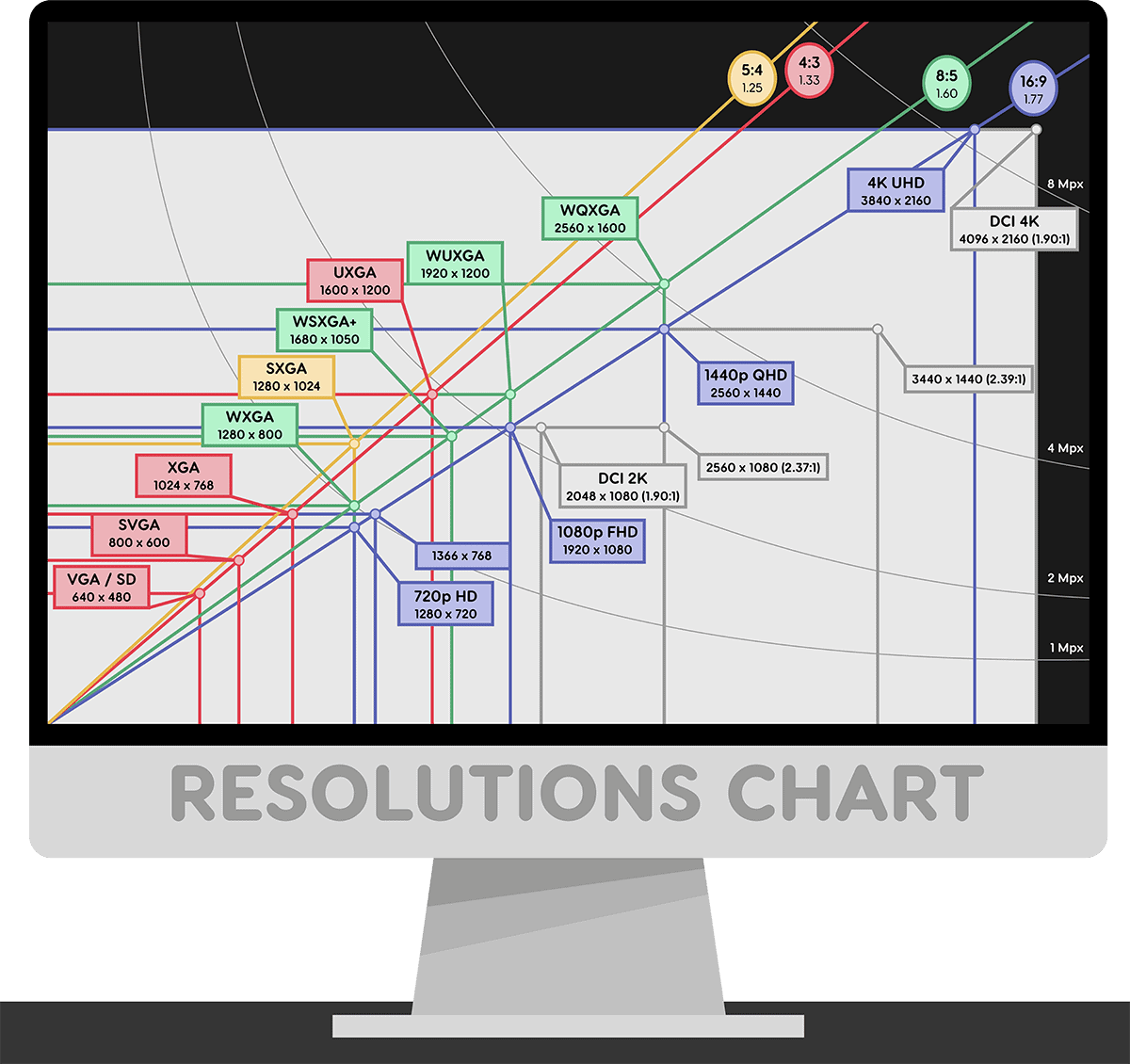
2560x1440 has a 16:9 aspect ratio. Divide both numbers by their greatest common divisor, 160, and you get 16:9 (2560 ÷ 160 = 16 and 1440 ÷ 160 = 9). This resolution is called QHD (Quad HD) or 1440p because it holds four times the pixels of 1280x720 HD, about 3.7 million pixels in total. Quick reference for common widescreen resolutions and their aspect ratios:
  • 16:9: 1280 x 720 (HD), 1920 x 1080 (FHD), 2560 x 1440 (QHD), 3840 x 2160 (4K UHD)
  • 16:10: 1280 x 800, 1920 x 1200 (WUXGA), 2560 x 1600 (WQXGA)
  • Ultra-wide (marketed as 21:9): 2560 x 1080, 3440 x 1440

Wide Aspect Ratio TFT Displays
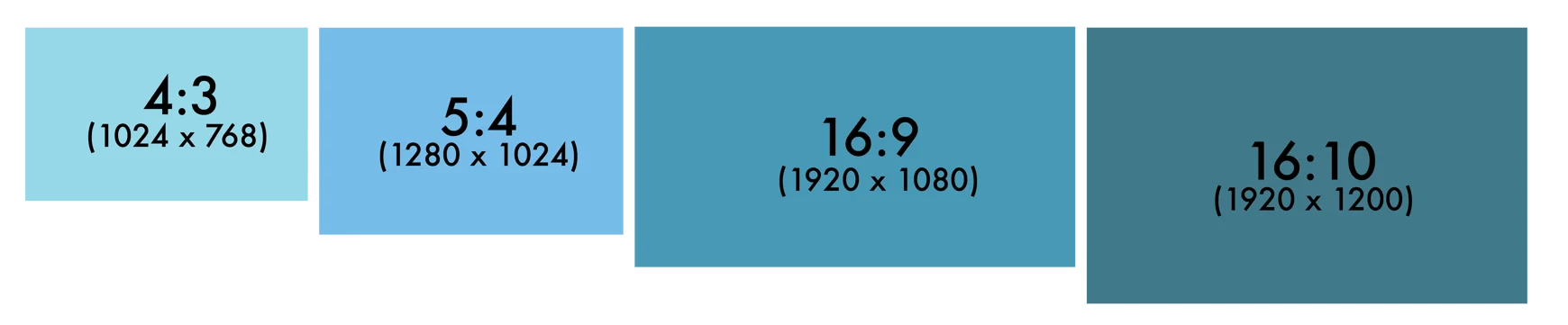
A display’s aspect ratio is the relationship between the width and height of the display. It is shown as two numbers separated by a colon (X:Y). Traditional displays are generally manufactured in near-square formats with small aspect ratios (e.g. 4:3). Having a wider aspect ratio first became popular for televisions to create a larger and more enhanced viewer experience. Today, most widescreen resolutions, including 1920 x 1080 and 2560 x 1440, use a 16:9 ratio. Today’s consumer now sees the value in having wide aspect ratios in personal electronics and the commercial industry is demanding displays that integrate more seamlessly into their spaces. Having a display with a wider aspect ratio allows you to display your message in a more unique and eye-catching way. E3 will work with you to choose the ideal ratio for the given application so you can optimize your space and profit.
Wide Aspect Ratio Infographic Wide Aspect Ratio Infographic
E3 Displays Resolution Chart Updates

Wide Aspect Ratio’s Effects on Resolution

When creating a display with a wide aspect ratio, the manufacturer also has to keep display resolution in mind. If the resolution is not designed to meet the ratio, then the image can end up only being viewed widescreen or will be stretched to fit the display, therefore, causing image distortion. For example, a 2560 x 1440 signal maps pixel for pixel onto a native 16:9 QHD panel, but a 16:10 panel must letterbox or scale it. E3 can enhance high quality 4K Ultra HD wide aspect ratio displays that still show the same high quality images.

Common Display Resolutions and Their Aspect Ratios

All five resolutions below share the same 16:9 widescreen aspect ratio. They differ in pixel count, which sets how sharp the image looks at a given screen size.

720p

720 pixels (1280 x 720) is the lowest HDTV utilized and is the most widespread. The “p” stands for progressive scan, meaning every line of the image is drawn in each frame.

1440p (QHD)

1440 pixels (2560 x 1440) is not as widespread but is often found in computers and smartphones. 1440p has 4x the pixels of 720p HD resolution. Its aspect ratio is 16:9, and it is also called QHD or WQHD.

1080p

1080 pixels (1920 x 1080) is the modern standard for consumer electronics. It is also known as full high definition (FHD).

4K

4K resolution (3840 x 2160) has 4x more pixels than 1080p. 4K is often found in online videos, commercial televisions, and video projection.

8K

8K resolution refers to an image or display resolution of 7680 × 4320 and is the successor to 4K resolution in the consumer TV market.

Benefits of Wide Aspect Ratio Displays

Ultra Wide Stretch Option

Adaptability to space is important in identifying a high quality display. E3 can enhance ultra wide stretch displays to improve unique displays that cannot fulfill their purpose with standard sizing. Stretched (bar-type) TFT displays fit long, narrow spaces such as shelf edges, transit headers and equipment panels.

Formats in 16:9 and 16:10

A 16:9 panel matches HD, FHD, QHD and 4K content without scaling, while a 16:10 panel adds extra vertical space for menus, dashboards and control interfaces. There is never a one size fits all display. E3 works with you side by side to choose and customize a display solution made for you and your goals so you can have highly efficient and cost effective tools.

Multi-Touch Capabilities

Enabling your viewers to interact with your displays is the next step in showcasing your message and strengthening your impact. E3 can enhance wide aspect ratio displays to have multi touch interactive capabilities to transition from a purely visual experience to an interactive dynamic user experience. Our PCAP touchscreens and touch panels support multi-touch gestures through protective cover glass.

Full Definition Up to 4K Resolution

Your display is an investment into the future of your business and should never be just satisfactory. E3 enhancements are nothing short of high quality and improves the visual performance of your display so you stand out from your competition.

Professional Commercial Grade Options

E3 will enhance your displays so that they can withstand the toughest requirements, allowing you to focus on what you do best, providing high quality customer service. For harsh environments, see our rugged displays and wide temperature displays.

All Light Readability

Displays that are not built for the right environment can cause you to miss viewers. E3 Displays can enhance wide aspect ratio displays with LED backlighting across the entire panel so your message stands out in any environment. For outdoor or bright-light use, we pair high-brightness backlights with optical bonding and anti-reflective film to create sunlight readable displays.

Our Experienced Team is Ready to Help

Our E3 Displays team has expertise in every type of display technology, whether big or small. We will help you choose or design the display that best fits your needs, while always keeping quality and budget in mind. Here at E3 Displays, we specialize in custom displays use our product selection guide today to get started on your project today!

FAQ
Frequently Asked Questions

What aspect ratio is 2560x1440?

2560x1440 has a 16:9 aspect ratio. Dividing 2560 and 1440 by their greatest common divisor, 160, gives 16:9. It is the same widescreen ratio used by 720p, 1080p and 4K UHD, so 16:9 video and games fill a 2560x1440 screen without black bars or stretching.

Is 2560x1440 16:9 or 16:10?

2560x1440 is 16:9, not 16:10. The 16:10 resolution with the same width is 2560x1600 (WQXGA), which adds 160 extra rows of pixels. If you show 2560x1440 content on a 16:10 panel, the display must either add black bars at the top and bottom or scale the image.

What is QHD resolution?

QHD, or Quad HD, is a resolution of 2560 x 1440 pixels with a 16:9 aspect ratio. It is called “quad” because it contains four times the pixels of 1280 x 720 HD. QHD is also known as 1440p or WQHD and is common on desktop monitors, laptops and smartphones.

How do you calculate a screen’s aspect ratio?

To calculate a screen’s aspect ratio, divide the horizontal and vertical pixel counts by their greatest common divisor. For 2560 x 1440, the divisor is 160, which gives 16:9. For 1920 x 1200, the divisor is 240, which gives 16:10. You can also divide width by height: 1.78 equals 16:9 and 1.6 equals 16:10.

What are the most common widescreen resolutions?

The most common widescreen resolutions are 1280 x 720 (HD), 1920 x 1080 (Full HD), 2560 x 1440 (QHD) and 3840 x 2160 (4K UHD), all 16:9. Popular 16:10 resolutions include 1920 x 1200 and 2560 x 1600, and ultra-wide monitors often use 2560 x 1080 or 3440 x 1440.

What is the difference between 16:9 and 16:10 displays?

A 16:9 display is slightly wider and shorter than a 16:10 display of the same width. 16:9 matches most video content, while 16:10 gives about 11% more vertical space for documents, dashboards and control software. E3 Displays offers custom TFT displays in both formats, plus ultra-wide stretch options.

Can E3 Displays build a custom wide aspect ratio display?

Yes. E3 Displays customizes wide aspect ratio TFT displays in 16:9, 16:10 and ultra-wide stretch formats, in landscape or portrait orientation. Our Phoenix engineering team can add multi-touch PCAP, LED backlighting for all light readability, optical bonding and other enhancements to suit your application and budget.

    Which of the following best describes you?

    Please describe your current project situation

    What is most important for you?

    Select all that apply

    You're all set!

    Tell us about yourself and we'll reach out with tailored solution options.